Obsidian vault
- Ref
- U1
- Category
- software
- Status
- in use
- Year
- 2025
- Rev
- B
The one Obsidian vault I keep everything in, organized so that most of it files itself, synced across my devices and a Mac mini, and shared with the agents that help me run it.
My Obsidian vault is where I learn, think, plan and keep track of things. It holds over one thousand notes, from book and film notes, trips and web-clippings, to my Chinese class notes, my SAT prep, weekly reflections and the concepts and documentation for projects, some of which end up on this site. I started the current vault in May 2025, and most of how it’s organized is borrowed from Steph Ango’s vault: one vault for everything, very few folders, pluralized tags and categories, lots of internal links and a 7-point rating scale.
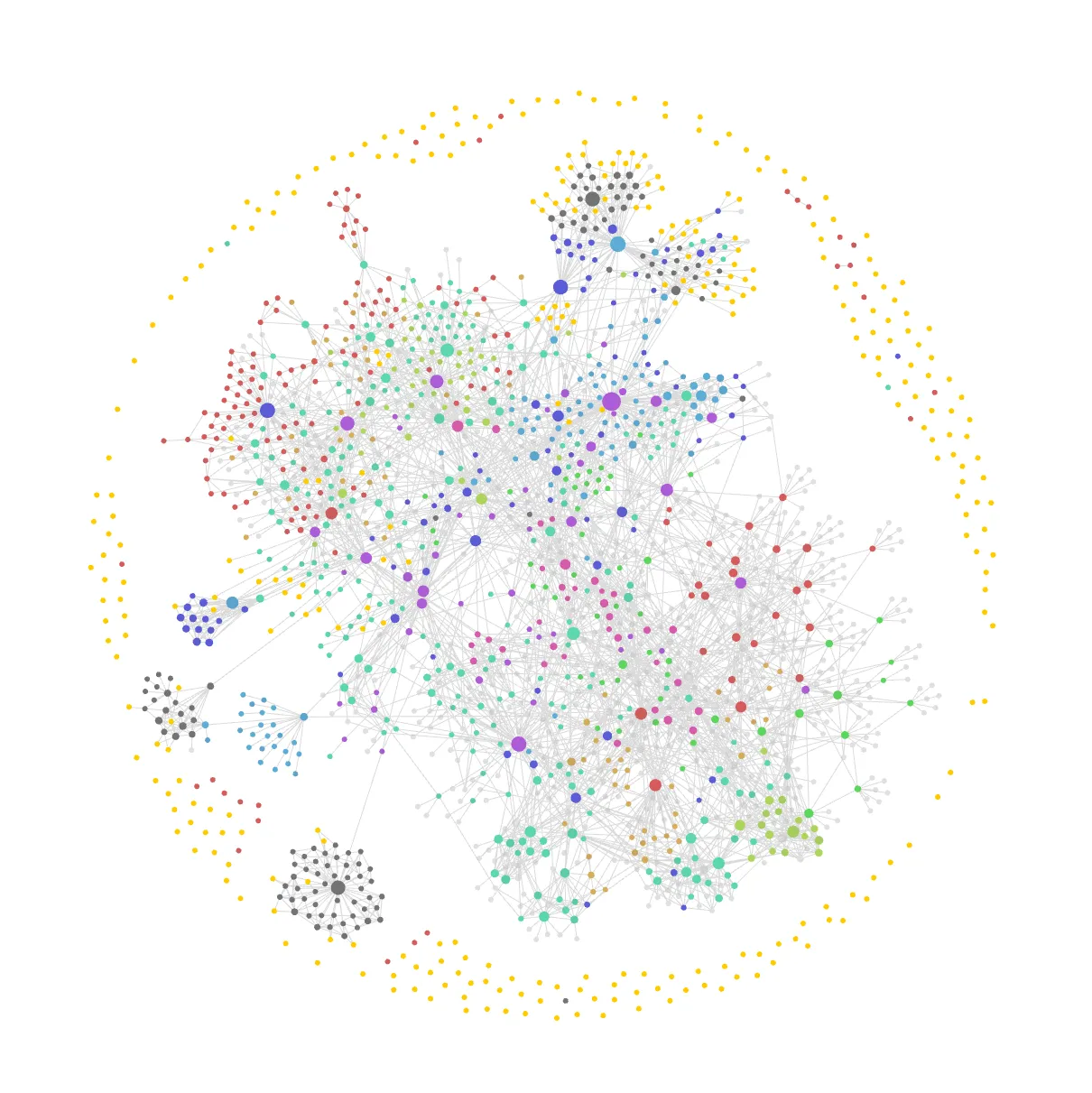
The whole vault in Obsidian’s graph view, with every note as a dot and every link as a line. The colours mark the main kinds of note, like books, films, projects, areas and contemplations, and the ring around the edge is attachments and notes that aren’t linked to anything yet.
It’s also the part of my setup that Atlas works with the most, so the vault has its own AGENTS.md file that sets out exactly how it works and how agents should work with it.
How it’s organized
The structure has four levels. At the top there are a few spaces, mainly one for my personal life and one for self-learning. Each space has areas, which are the parts of my life a note can belong to, like Health, Trips, Keyboards or Chinese. Areas can have sub-areas, and those can nest as deep as they need to, so Health has Physical Health, which has Exercise, which has Cycling, which has Bikepacking. Areas then have projects, anything with a goal and usually an end, like a keyboard build, a 3D printed part or a piece of software. Finally there are the notes themselves, which can belong to a project or sit directly under an area when they aren’t part of anything bigger.
Each level points at the one above it with a property, so a note says which project it belongs to with projects, and a project or a sub-area names the areas it belongs to with areas. None of the hub notes keep a list of what’s underneath them. Instead they embed a base, a saved query that Obsidian runs every time the note is opened, which lists every note pointing at them (the space notes are the simplest, they just list every area). So when I write a new note I only have to say where it belongs, and it shows up in the right places on its own, without a list somewhere that goes stale when I forget to update it.
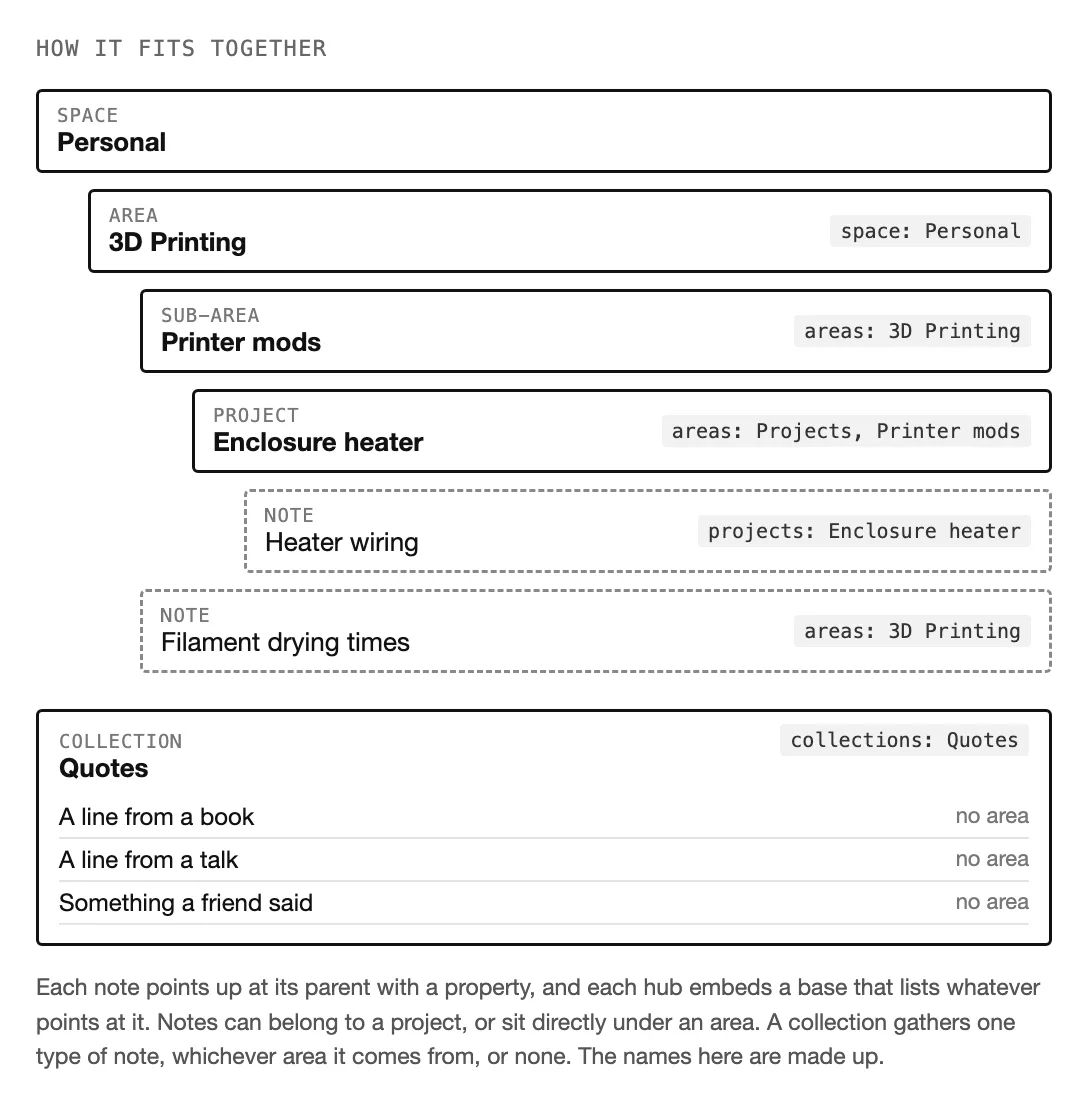
Every note points at its parent, and every hub lists whatever points at it.
Collections sit beside all of this rather than inside it. A collection is just a group of notes of the same type, no matter which area they come from, or whether they belong to one at all. Quotes gathers every quote I’ve saved, wherever it came from, and Contemplations holds my longer reflections, which some of my garden posts start from. Others are packing lists, wishlists and paradoxes. A note joins one with the collections property, and can be in an area and a collection at the same time.
Folders
Folders only do a small part of the work. Courses get them, since a course has a fixed structure (a folder for the course, a folder of class notes from each lesson, and a folder of the notes that come out of those), and so do a few kinds of notes there are a lot of. Everything else goes into one flat folder.
| Folder | What’s in it |
|---|---|
| Personal | Almost everything I write, flat, plus subfolders for books, films, YouTube videos, countries and cities, weekly and yearly notes, contemplations and the bike guide |
| Self-Learning | One folder per course or subject: Chinese, the SAT and CS50x |
| Clippings | Articles and pages saved with the web clipper, and quotes |
| Supernote | Notebooks synced from the Supernote |
| Templates | Note templates, and a folder of smaller section templates |
| Bases | The saved queries the hub notes embed |
| Attachments, Scripts | Images and files, and the QuickAdd scripts |
I don’t move notes into those subfolders myself, an auto note mover plugin files them there for me.
Templates and properties
Every note starts from a template, of which there are around forty, plus a dozen small section templates I can drop into an existing note. The templates are what keep the properties consistent, so a book always has an author, a year, a genre, a status and a rating, and a trip always has its dates, countries, cities and a linked packing list and expenses note. I try to reuse property names across templates rather than inventing new ones, and to make them lists rather than plain text, so that one base can work across every kind of note (topics, related and people mean the same thing everywhere).
There are 43 bases in total, and the same idea shows up all over the vault. Cities and countries carry coordinates, so the trips area can show a map of everywhere I’ve been. Each weekly note has a table of everything I created that week, which is a good starting point for writing the note itself.
Ratings use a scale from 1 to 7, where 7 is life-changing and 1 is life-changing in a bad way. I like 7 better than 5 or 10, since I want more room at the top for the good experiences, but 10 is more granularity than I can actually tell apart.
What I use it for
| For | How |
|---|---|
| Learning | Class notes for Chinese and CS50x, and one note per mistake on SAT practice tests, each with the steps I should have followed |
| Media | Books, films and YouTube videos, each rated, with separate notes for what I took away from them |
| Trips | Plans, packing lists, expenses, and notes on the cities and countries I’ve been to |
| Projects | Keyboards, 3D printing, the Mac mini and everything running on it, and quite a few ideas I haven’t started yet |
| Reflection | A weekly note, a yearly note, and a collection of longer reflections, some of which end up in my digital garden |
Chinese is the clearest example of how the pieces fit together. During class I write everything down in that day’s note as fast as I can, which is never very tidy. When the class ends in my calendar, Atlas picks up the note, turns my scribbles into a vocabulary table with pinyin, a translation and an example sentence for each word, links back to earlier classes where a word already came up, adds the new words to my Anki deck, and commits the change under its own name. The handwriting sheets from xiehanzi go the other way, onto my Supernote, and the notebooks I write in come back into the vault as ordinary files I can link to and embed.
Where it lives
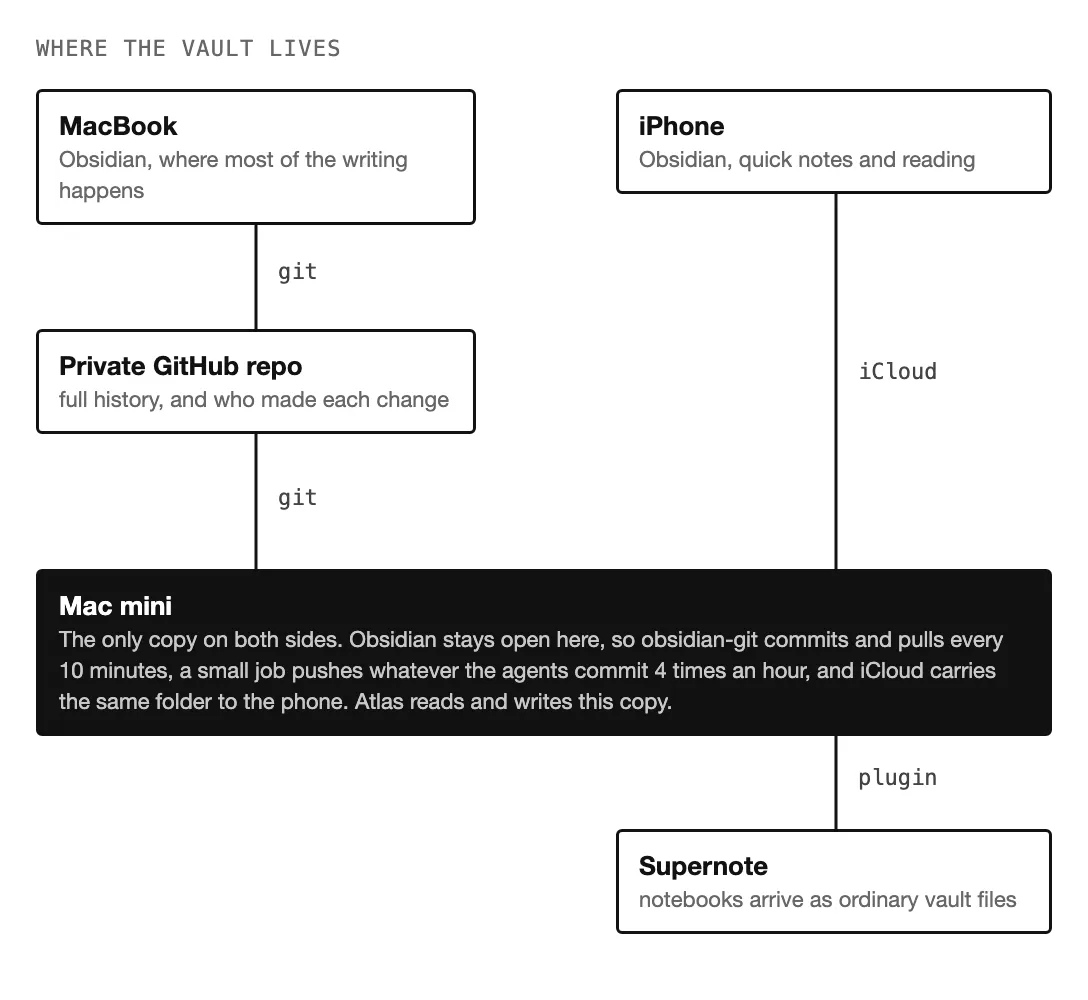
Three devices, two sync systems, and the Mac mini in the middle.
The vault is just a folder of markdown files, so syncing it is a matter of choosing how to copy a folder around. My MacBook syncs through git and a private GitHub repo, the phone through iCloud, and the Mac mini sits on both sides, with Obsidian left open on it so that obsidian-git commits and pulls every 10 minutes. Since obsidian-git only pushes when it has something of its own to commit, a small job on the mini also pushes anything the agents committed, a few times an hour.
Using git has the nice side effect of a full history. There are about 3,400 commits so far, and most of them are the automatic backups every 10 minutes, but around 630 are from the agents that have worked in the vault over the last year (first Claude on its own, then Hermes, now Atlas and Codex), each under its own name, so I can always see which changes were mine and which weren’t.
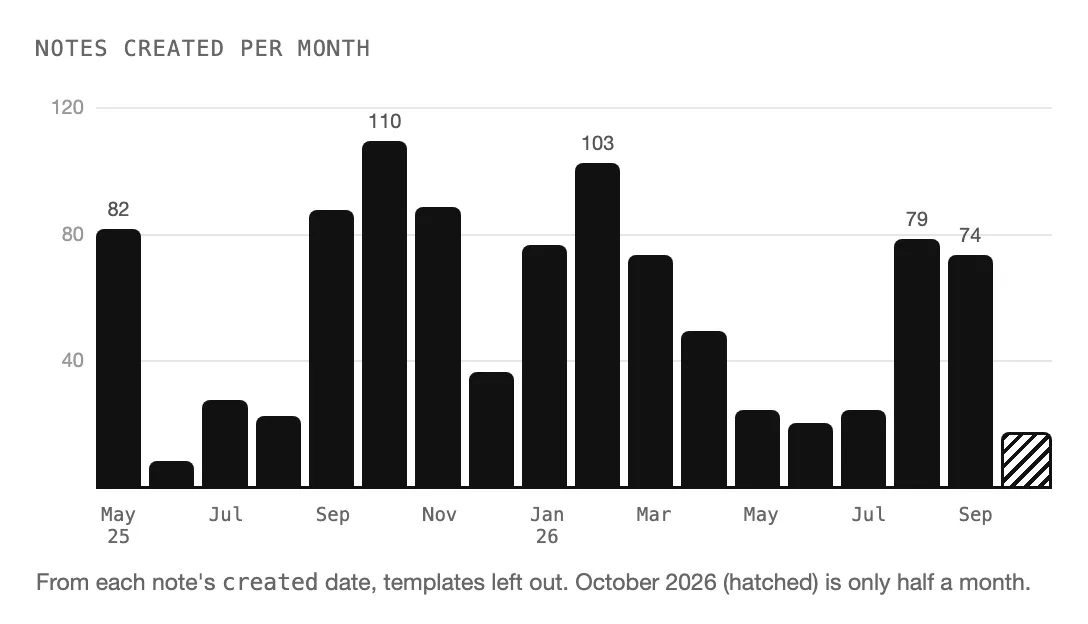
It grows in bursts rather than steadily.
Working with agents
The AGENTS.md file says how notes are structured, which template to use for what, and a few rules for working in the vault. The most important rule is about who writes. Reading is always fine, but an agent only writes to the vault when I’ve asked it to in that conversation, and a question like “how should I prepare for this?” gets an answer in the chat, not three new notes. I also write what I learn myself, since writing it is most of the learning, so agents can tidy up my notes afterwards (formatting, links, spelling, properties) but don’t add their own explanations, and if something I wrote is wrong they tell me rather than quietly fixing it. Earlier on I let agents write freely, and the result was a lot of long notes full of callouts that didn’t really feel like mine anymore.
Not every part of Atlas can see everything either. The parts that plan my training and my calendar can read the notes they need, like my plans and schedules, but not my journals, reflections or notes on people, and nothing that runs on its own can delete a note.
Publishing from it
A few of the notes end up public, in my digital garden. Once a week a small script looks through the vault for notes that might be worth publishing, a rule file decides which kinds of notes can be drafted without asking me first, and anything else waits for my decision. A note I never want published gets publish: false, which is the only thing that property does. The drafts then go through the same checks as this site and arrive as pull requests, so nothing goes public until I’ve looked at the preview and merged it myself.
Plugins
29 community plugins are turned on, though only a handful really shape how the vault works: obsidian-git for the history and the sync, Auto Note Mover for filing notes into their folders, QuickAdd for small scripts (one fills in a book note from Google Books, another creates a city with its coordinates and a flag), Journals for the class notes and weekly notes, Maps for the travel map, the Supernote sync plugin, and LaTeX Suite for maths.
Revisions
| Rev | Date | Change |
|---|---|---|
| A | 2026-10-15 | First published. |
| B | 2026-10-28 | Card cover shows the whole graph. |